mathjax

Showing posts with label wukong. Show all posts

Friday, February 4, 2011

Brute Force Graph Crunching With Pig and Wukong

Just discovered this amazing data set matching all Marvel Universe comic book characters with the comic books they've appeared in (Social Characteristics of the Marvel Universe). I've made the data set available on Infochimps here in a sane and easy to use format.

Here's what that looks like:

$: head labeled_edges.tsv | wu-lign
"FROST, CARMILLA" "AA2 35"
"KILLRAVEN/JONATHAN R" "AA2 35"
"M'SHULLA" "AA2 35"
"24-HOUR MAN/EMMANUEL" "AA2 35"
"OLD SKULL" "AA2 35"
"G'RATH" "AA2 35"
"3-D MAN/CHARLES CHAN" "M/PRM 35"
"3-D MAN/CHARLES CHAN" "M/PRM 36"
"3-D MAN/CHARLES CHAN" "M/PRM 37"
"HUMAN ROBOT" "WI? 9"


Simple Question


A natural question to ask of such an awesome graph is for the similarity between two characters based on what comic books they've appeared in together. This is called the structural similarity since we're only using the structure of the graph and no other meta data (weights, etc). Note that this could also be applied the other direction to find the similarity between two comic books based on what characters they share.

Wee bit of math


The structural similarity is nothing more than the jaccard similarity applied to nodes in a network graph. Here's the definition of that from wikipedia:
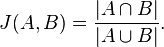


So basically all we've got to do is get a list of all the comic books that two characters, say character A and character B, have appeared in. These lists of comic books form two mathematical sets.

The numerator in that simple formula says to compute the intersection of A and B and then count how many elements are left. More plainly, that's just the number of comic books the two characters have in common.

The denominator tells us to compute the union of A and B and count how many elements are in the resulting set. That's just the number of unique comic books that A and B have ever been in, either at the same time or not.

Pig


Here how we're going to say it using pig:


DEFINE jaccard_similarity `ruby jaccard_similarity.rb --map` SHIP('jaccard_similarity.rb');
edges = LOAD '/data/comics/marvel/labeled_edges.tsv' AS (character:chararray, comic:chararray);
grouped = GROUP edges BY character;
with_sets = FOREACH grouped GENERATE group AS character, FLATTEN(edges.comic) AS comic, edges.comic AS set;
SPLIT with_sets INTO with_sets_dup IF ( 1 > 0 ), not_used if (1 < 0); -- hack hack hack, self join still doesn't work
joined = JOIN with_sets BY comic, with_sets_dup BY comic;
pairs = FOREACH joined GENERATE
with_sets::character AS character_a,
with_sets::set AS character_a_set,
with_sets_dup::character AS character_b,
with_sets_dup::set AS character_b_set
;
similarity = STREAM pairs THROUGH jaccard_similarity AS (character_a:chararray, character_b:chararray, similarity:float);
STORE similarity INTO '/data/comics/marvel/character_similarity.tsv';


Notice we're doing a bit of funny business here. Writing the actual algorithm for the jaccard similarity between two small sets doesn't make much sense in Pig. Instead we've written a wukong script to do it for us (you could also write a Pig udf if you're a masochist).

The first thing we do here is use the DEFINE operator to tell pig that there's an external command we want to call, the alias for it, how to call it, and to SHIP the script we need to all nodes in the cluster.

Next we use the GROUP operator and then the FOREACH..GENERATE projection operator to get, for every character, a the list of comic books they've appeared in.

We also use the FLATTEN operator during the projection as well. The reason is so that we can use the JOIN operator to pull out (character,character) pairs that have at least one comic book in common. (Don't get scared about the gross looking SPLIT operator in there. Just ignore it. It's a hack to get around the fact that self-joins still don't quite work properly in pig. Pretend we're just joining 'with_sets' with itself.)

The last step is to STREAM our pairs through the simple wukong script. Here's what that looks like:


#!/usr/bin/env ruby

require 'rubygems'
require 'wukong'
require 'wukong/and_pig' # for special conversion methods
require 'set'

#
# Takes two pig bags and computes their jaccard similarity
#
# eg.
#
# input:
#
# (a,{(1),(2),(3)}, b, {(2),(9),(5)})
#
# output:
#
# (a, b, 0.2)
#
class JaccardSim < Wukong::Streamer::RecordStreamer
def process node_a, set_a, node_b, set_b
yield [node_a, node_b, jaccard(set_a, set_b)]
end

def jaccard bag_a, bag_b
common_elements = ((bag_a.from_pig_bag.to_set).intersection(bag_b.from_pig_bag.to_set)).size
total_elements = ((bag_a.from_pig_bag.to_set).union(bag_b.from_pig_bag.to_set)).size
common_elements.to_f / total_elements.to_f
end
end

Wukong::Script.new(JaccardSim, nil).run


Notice the nifty 'from_pig_bag' method that wukong has. All we're doing here is converting the two pig bags into ruby 'set' objects then doing the simple jaccard similarity calculation. (3 lines of code for the calculation itself, still want to do it in java?)

And that's it. Here's what it looks like after running:


"HUMAN TORCH/JOHNNY S" "GALACTUS/GALAN" 0.0514112900
"HUMAN TORCH/JOHNNY S" "ROGUE /" 0.0371308030
"HUMAN TORCH/JOHNNY S" "UATU" 0.0481557360
"LIVING LIGHTNING/MIG" "USAGENT DOPPELGANGER" 0.0322580640
"LIVING LIGHTNING/MIG" "STRONG GUY/GUIDO CAR" 0.1052631600
"LIVING LIGHTNING/MIG" "STORM/ORORO MUNROE S" 0.0209059230
"LIVING LIGHTNING/MIG" "USAGENT/CAPTAIN JOHN" 0.1941747500
"LIVING LIGHTNING/MIG" "WASP/JANET VAN DYNE " 0.0398089180
"LIVING LIGHTNING/MIG" "THING/BENJAMIN J. GR" 0.0125120310
"LIVING LIGHTNING/MIG" "WOLFSBANE/RAHNE SINC" 0.0209059230
"LIVING LIGHTNING/MIG" "THUNDERSTRIKE/ERIC K" 0.1153846160
"LIVING LIGHTNING/MIG" "WILD CHILD/KYLE GIBN" 0.0434782600


Sweet.

Wednesday, January 26, 2011

Graph Processing With Apache Pig

So, you're probably sick of seeing this airport data set by now (flight edges) but it's so awesome that I have to re-use it. Let's use Pig to do the same calculation as this post in a much more succinct way. We'll really get a feel for what Pig is better at than Wukong.

Degree Distribution


Since the point here is to illustrate the difference between the wukong way and the pig way we're not going to introduce anything clever here. Here's the code for calculating the degree by month (both passengers and flights) for every domestic airport since 1990:


--
-- Caculates the monthly degree distributions for domestic airports from 1990 to 2009.
--
-- Load data (boring part)
flight_edges = LOAD '$FLIGHT_EDGES' AS (origin_code:chararray, destin_code:chararray, passengers:int, flights:int, month:int);

-- For every (airport,month) pair get passengers, seats, and flights out
edges_out = FOREACH flight_edges GENERATE
origin_code AS airport,
month AS month,
passengers AS passengers_out,
flights AS flights_out
;

-- For every (airport,month) pair get passengers, seats, and flights in
edges_in = FOREACH flight_edges GENERATE
destin_code AS airport,
month AS month,
passengers AS passengers_in,
flights AS flights_in
;

-- group them together and sum
grouped_edges = COGROUP edges_in BY (airport,month), edges_out BY (airport,month);
degree_dist = FOREACH grouped_edges {
passenger_degree = SUM(edges_in.passengers_in) + SUM(edges_out.passengers_out);
flights_degree = SUM(edges_in.flights_in) + SUM(edges_out.flights_out);
GENERATE
FLATTEN(group) AS (airport, month),
passenger_degree AS passenger_degree,
flights_degree AS flights_degree
;
};

STORE degree_dist INTO '$DEG_DIST';


So, here's what's going on:


  • FOREACH..GENERATE: this is called a 'projection' in pig. Here we're really just cutting out the fields we don't want and rearranging our records. This is exactly the same as what we do in the wukong script, where we yielded two different types of records for the same input data in the map phase, only a lot more clear.

  • COGROUP: here we're simply joining our two data relations together (edges in and edges out) by a common key (airport code,month) and aggregating the values for that key. This is exactly the same as what we do in the 'accumulate' part of the wukong script.

  • FOREACH..GENERATE (once more): here we run through our grouped records and sum the flights and passengers. This is exactly the same as the 'finalize' part of the wukong script.


So, basically, we've done in 4 lines (not counting the LOAD and STORE or the prettification) of very clear and concise code what took us ~70 lines of ruby. Win.

Here's the wukong one again for reference:


#!/usr/bin/env ruby

require 'rubygems'
require 'wukong'

class EdgeMapper < Wukong::Streamer::RecordStreamer
#
# Yield both ways so we can sum (passengers in + passengers out) and (flights
# in + flights out) individually in the reduce phase.
#
def process origin_code, destin_code, passengers, flights, month
yield [origin_code, month, "OUT", passengers, flights]
yield [destin_code, month, "IN", passengers, flights]
end
end

class DegreeCalculator < Wukong::Streamer::AccumulatingReducer
#
# What are we going to use as a key internally?
#
def get_key airport, month, in_or_out, passengers, flights
[airport, month]
end

def start! airport, month, in_or_out, passengers, flights
@out_degree = {:passengers => 0, :flights => 0}
@in_degree = {:passengers => 0, :flights => 0}
end

def accumulate airport, month, in_or_out, passengers, flights
case in_or_out
when "IN" then
@in_degree[:passengers] += passengers.to_i
@in_degree[:flights] += flights.to_i
when "OUT" then
@out_degree[:passengers] += passengers.to_i
@out_degree[:flights] += flights.to_i
end
end

#
# For every airport and month, calculate passenger and flight degrees
#
def finalize

# Passenger degrees (out, in, and total)
passengers_out = @out_degree[:passengers]
passengers_in = @in_degree[:passengers]
passengers_total = passengers_in + passengers_out

# Flight degrees (out, in, and total)
flights_out = @out_degree[:flights]
flights_in = @in_degree[:flights]
flights_total = flights_in + flights_out

yield [key, passengers_in, passengers_out, passengers_total, flights_in, flights_out, flights_total]
end
end

#
# Need to use 2 fields for partition so every record with the same airport and
# month land on the same reducer
#
Wukong::Script.new(
EdgeMapper,
DegreeCalculator,
:partition_fields => 2 # use two fields to partition records
).run


Plot Data


A very common workflow pattern with Hadoop is to use a tool like pig or wukong to process large scale data and generate some result data set. The last step in this process is (rather obviously) to summarize that data in some way. Here's a quick plot (using R and ggplot2) of the flights degree distribution after I further summarized by year:


That's funny...


Finally, here's the code for the plot:


# include the ggplot2 library for nice plots
library(ggplot2);

# Read data in and take a subset
degrees <- read.table('yearly_degrees.tsv', header=FALSE, sep='\t', colClasses=c('character', 'character', 'numeric', 'numeric'));
names(degrees) <- c('airport_code', 'year', 'passenger_degree', 'flights_degree');
select_degrees <- subset(degrees, year=='2000' | year=='2001' | year=='2002' | year=='2009' | year=='1990');

# Plotting with ggplot2
pdf('passenger_degrees.pdf', 12, 6, pointsize=10);
ggplot(select_degrees, aes(x=passenger_degree, fill=year)) + geom_density(colour='black', alpha=0.3) + scale_x_log10() + ylab('Probability') + xlab(expression(log[10] ('Passengers in + Passengers out'))) + opts(title='Passenger Degree Distribution')


Hurray.

Friday, January 21, 2011

Pig, Bringing Simplicity to Hadoop

In strong contrast to the seat-of-your-pants style of Wukong there is another high level language for Hadoop called Pig. See Apache Pig.

Overview


At the top level, here's what Pig gets you:


  • No java required. That is, use as little (zero) or as much (reams) of java code as you want.

  • No boilerplate code

  • Intuitive and easy to understand language (similar to SQL) with clean uniform syntax

  • Separation of high level algorithm and low level map-reduce jobs

  • Build your analysis as a set of operations acting on data

  • Most algorithms are less than 5, human readable, lines of Pig


Get Pig


Go here and download pig (version 0.8) from somewhere close to you. Unpack it and put it wherever you like. Then, type 'pig' at the command line and see what happens. It's very likely that it doesn't pick up your existing Hadoop configuration. To fix that set HADOOP_HOME to point to your hadoop installation and PIG_CLASSPATH to point to your hadoop configuration (probably /etc/hadoop/conf). Here's all that again:


$: wget http://mirrors.axint.net/apache//pig/pig-0.8.0/pig-0.8.0.tar.gz
$: tar -zxf pig-0.8.0.tar.gz
$: sudo mv pig-0.8.0 /usr/local/share/
$: sudo ln -s /usr/local/share/pig-0.8.0 /usr/local/share/pig
$: sudo ln -s /usr/local/share/pig/bin/pig /usr/local/bin/pig
$: hash -r
$: export HADOOP_HOME=/usr/lib/hadoop
$: export PIG_CLASSPATH=/etc/hadoop/conf
$: pig
2011-01-21 09:56:32,486 [main] INFO org.apache.pig.Main - Logging error messages to: /home/jacob/pig_1295625392480.log
2011-01-21 09:56:32,879 [main] INFO org.apache.pig.backend.hadoop.executionengine.HExecutionEngine - Connecting to hadoop file system at: hdfs://master:8020
2011-01-21 09:56:33,402 [main] INFO org.apache.pig.backend.hadoop.executionengine.HExecutionEngine - Connecting to map-reduce job tracker at: master:54311
grunt>


See how easy that was. Get it over with now.

Firsties


People post the most interesting data on Infochimps. Let's get the first billion digits of pi here. Notice that it's arranged in groups of 10 digits with 10 groups per line. We're going to use pig to see how the digits are distributed.

This will allow us to visually (once we make a plot) spot any obvious deviation from a random series of numbers. That is, for a random series of numbers we'd expect each digit (0-9) to appear equally often. If this isn't true then we know we're dealing with a more complicated beast.

Pre-Process


After catting the data file you'll notice the end of the line has the crufty details attached that makes this data more or less impossible to load into Pig as a table. Pig is terrible at data munging/parsing/cleaning. Thankfully we have wukong. Let's write a dead simple wukong script to fix the last field and create one digit per line:


#!/usr/bin/env ruby

require 'rubygems'
require 'wukong'

class PiCleaner < Wukong::Streamer::LineStreamer
def process line
fields = line.strip.split(' ', 10)
hundred_digit_string = [fields[0..8], fields[9][0..9]].join rescue ""
hundred_digit_string.each_char{|digit| yield digit}
end
end

Wukong::Script.new(PiCleaner, nil).run


Let's go ahead and run that right away (this will take a few minutes depending on your rig, it'll be a billion lines of output...):

$: hdp-mkdir /data/math/pi/
$: hdp-put pi-010.txt /data/math/pi/
$: ./pi_clean.rb --run /data/math/pi/pi-010.txt /data/math/pi/first_billion_digits.tsv
I, [2011-01-22T11:01:57.363704 #12489] INFO -- : Launching hadoop!
I, [2011-01-22T11:01:57.363964 #12489] INFO -- : Running

/usr/local/share/hadoop/bin/hadoop \
jar /usr/local/share/hadoop/contrib/streaming/hadoop-*streaming*.jar \
-D mapred.reduce.tasks=0 \
-D mapred.job.name='pi_clean.rb---/data/math/pi/pi-010.txt---/data/math/pi/first_billion_digits.tsv' \
-mapper '/usr/bin/ruby1.8 pi_clean.rb --map ' \
-reducer '' \
-input '/data/math/pi/pi-010.txt' \
-output '/data/math/pi/first_billion_digits.tsv' \
-file '/home/jacob/Programming/projects/data_recipes/examples/pi_clean.rb' \
-cmdenv 'RUBYLIB=~/.rubylib'

11/01/22 11:01:59 INFO mapred.FileInputFormat: Total input paths to process : 1
11/01/22 11:01:59 INFO streaming.StreamJob: getLocalDirs(): [/usr/local/hadoop-datastore/hadoop-jacob/mapred/local]
11/01/22 11:01:59 INFO streaming.StreamJob: Running job: job_201012031305_0251
11/01/22 11:01:59 INFO streaming.StreamJob: To kill this job, run:
11/01/22 11:01:59 INFO streaming.StreamJob: /usr/local/share/hadoop/bin/../bin/hadoop job -Dmapred.job.tracker=master:54311 -kill job_201012031305_0251
11/01/22 11:01:59 INFO streaming.StreamJob: Tracking URL: http://master:50030/jobdetails.jsp?jobid=job_201012031305_0251
11/01/22 11:02:00 INFO streaming.StreamJob: map 0% reduce 0%
11/01/22 11:05:11 INFO streaming.StreamJob: map 100% reduce 100%
11/01/22 11:05:11 INFO streaming.StreamJob: Job complete: job_201012031305_0251
11/01/22 11:05:11 INFO streaming.StreamJob: Output: /data/math/pi/first_billion_digits.tsv
packageJobJar: [/home/jacob/Programming/projects/data_recipes/examples/pi_clean.rb, /usr/local/hadoop-datastore/hadoop-jacob/hadoop-unjar4401930660028806042/] [] /tmp/streamjob3153669001520547.jar tmpDir=null


Great. Now let's write some Pig:

Analysis


This is what Pig is awesome at. Remember that accumulating reducer in wukong? We're about to do the identical thing in two lines of no-nonsense pig:

-- load
digits = LOAD '$PI_DIGITS' AS (digit:int);

groups = GROUP digits BY digit;
counts = FOREACH groups GENERATE group AS digit, COUNT(digits) AS num_digits;

-- store
STORE counts INTO '$OUT';


All we're doing here is reading in the data (one digit per line), accumulating all the digits with the same 'digit', and counting them up. Save it into a file called 'pi.pig' and run with the following:


$: pig -p PI_DIGITS=/data/math/pi/first_billion_digits.tsv -p OUT=/data/math/pi/digit_counts.tsv pi.pig


I'll skip the output since it's rather verbose. Now we can make a simple plot by hdp-catting our output data into a local file (it's super tiny by now) and plotting it with R:


$: hdp-catd /data/math/pi/digit_counts.tsv > digit_counts.tsv
$: R
> library(ggplot2)
> digit_counts <- read.table('digit_counts.tsv', header=FALSE, sep="\t")
> names(digit_counts) <- c('digit', 'count')
> p <- ggplot(digit_counts, aes(x=digit)) + geom_histogram(aes(y = ..density.., weight = count, binwidth=1), colour='black', fill='grey', alpha=0.7)
> p + scale_y_continuous(limits=c(0,0.5))


Will result in the following:


I'll leave it to you to make your own assumptions.

Thursday, January 20, 2011

Graph Processing With Wukong and Hadoop

As a last (for now) tutorial oriented post on Wukong, let's process a network graph.

Get Data


This airport data (airport edges) from Infochimps is one such network graph with over 35 million edges. It represents the number of flights and passengers transported between two domestic airports in a given month. Go ahead and download it.

Explore Data


We've got to actually look at the data before we can make any decisions about how to process it and what questions we'd like answered:


$: head data/flights_with_colnames.tsv | wu-lign
origin_airport destin_airport passengers flights month
MHK AMW 21 1 200810
EUG RDM 41 22 199011
EUG RDM 88 19 199012
EUG RDM 11 4 199010
MFR RDM 0 1 199002
MFR RDM 11 1 199003
MFR RDM 2 4 199001
MFR RDM 7 1 199009
MFR RDM 7 2 199011


So it's exactly what you'd expect; An adjacency list with (origin node,destination node,weight_1,weight_2,timestamp). There are thousands of data sets with similar characteristics...

Ask A Question


A simple question to ask (and probably the first question you should ask of a graph) is what the degree distribution is. Notice there are two flavors of degree in our graph:

1. Passenger Degree: For a given airport (node in the graph) the number of passengers in + the number of passengers out. Passengers in is called the 'in degree' and passengers out is (naturally) called the 'out degree'.

2. Flights Degree: For a given airport the number of flights in + the number of flights out.

Let's write the question wukong style:

#!/usr/bin/env ruby

require 'rubygems'
require 'wukong'

class EdgeMapper < Wukong::Streamer::RecordStreamer
#
# Yield both ways so we can sum (passengers in + passengers out) and (flights
# in + flights out) individually in the reduce phase.
#
def process origin_code, destin_code, passengers, flights, month
yield [origin_code, month, "OUT", passengers, flights]
yield [destin_code, month, "IN", passengers, flights]
end
end

class DegreeCalculator < Wukong::Streamer::AccumulatingReducer
#
# What are we going to use as a key internally?
#
def get_key airport, month, in_or_out, passengers, flights
[airport, month]
end

def start! airport, month, in_or_out, passengers, flights
@out_degree = {:passengers => 0, :flights => 0}
@in_degree = {:passengers => 0, :flights => 0}
end

def accumulate airport, month, in_or_out, passengers, flights
case in_or_out
when "IN" then
@in_degree[:passengers] += passengers.to_i
@in_degree[:flights] += flights.to_i
when "OUT" then
@out_degree[:passengers] += passengers.to_i
@out_degree[:flights] += flights.to_i
end
end

#
# For every airport and month, calculate passenger and flight degrees
#
def finalize

# Passenger degrees (out, in, and total)
passengers_out = @out_degree[:passengers]
passengers_in = @in_degree[:passengers]
passengers_total = passengers_in + passengers_out

# Flight degrees (out, in, and total)
flights_out = @out_degree[:flights]
flights_in = @in_degree[:flights]
flights_total = flights_in + flights_out

yield [key, passengers_in, passengers_out, passengers_total, flights_in, flights_out, flights_total]
end
end

#
# Need to use 2 fields for partition so every record with the same airport and
# month land on the same reducer
#
Wukong::Script.new(
EdgeMapper,
DegreeCalculator,
:partition_fields => 2 # use two fields to partition records
).run


Don't panic. There's a lot going on in this script so here's the breakdown (real gentle like):

Mapper


Here we're using wukong's RecordStreamer class which reads lines from $stdin and splits on tabs for us already. That's how we know exactly what arguments the process method gets.

Next, as is often the case with low level map-reduce, we've got to be a bit clever in the way we yield data in the map. Here we yield the edge both ways and attach an extra piece of information ("OUT" or "IN") depending on whether the passengers and flights were going into the airport in a month or out. This way we can distinguish between these two pieces of data in the reducer and process them independently.

Finally, we've carefully rearranged our records such that (airport,month) is always the first two fields. We'll partition on this as the key. (We have to say that explicitly at the bottom of the script)

Reducer


We've seen all these methods before except for one. The reducer needs to know what fields to use as the key (it defaults to the first field). Here we've explicitly told it to use the airport and month as the key with the 'get_key' method.

* start! - Here we initialize the internal state of the reducer with two ruby hashes. One, the @out_degree will count up all the passengers and flights out. The @in_degree will do the same but for passengers and flights in. (Let's all take a moment and think about how awful and unreadable that would be in java...)

* accumulate - Here we simply look at each record and decide which counters to increment depending on whether it's "OUT" or "IN".

* finalize - All we're doing here is taking our accumulated counts, creating the record we care about, and yielding it out. Remember, the 'key' is just (airport,month).

Get An Answer


We know how to put the data on the hdfs and run the script by now so we'll skip that part. Here's what the output looks like:


$: hdp-catd /data/domestic/flights/degree_distribution | head -n20 | wu-lign
1B1 200906 1 1 2 1 1 2
ABE 200705 0 83 83 0 3 3
ABE 199206 0 31 31 0 1 1
ABE 200708 0 904 904 0 20 20
ABE 200307 0 91 91 0 2 2
ABE 200703 0 36 36 0 1 1
ABE 199902 0 84 84 0 1 1
ABE 200611 0 753 753 0 18 18
ABE 199209 0 99 99 0 1 1
ABE 200702 0 54 54 0 1 1
ABE 200407 0 98 98 0 1 1
ABE 200705 0 647 647 0 15 15
ABE 200306 0 27 27 0 1 1
ABE 200703 0 473 473 0 11 11
ABE 200309 0 150 150 0 1 1
ABE 200702 0 313 313 0 8 8
ABE 200103 0 0 0 0 1 1
ABE 199807 0 105 105 0 1 1
ABE 199907 0 91 91 0 1 1
ABE 199501 0 50 50 0 1 1


At this point is where you might bring this back down to your local file system, crack open a program like R, make some plots, etc.

And we're done for now. Hurray.

Monday, January 17, 2011

Processing XML Records with Hadoop and Wukong

Another common pattern that Wukong addresses exceedingly well is liberating data from unwieldy formats (XML) into tsv. For example, lets consider the following Hacker News dataset: See RedMonk Analytics

A single record looks like this:


<row><ID>33</ID><ParentID>31</ParentID><Text>&lt;font color="#5a5a5a"&gt;winnar winnar chicken dinnar!&lt;/font&gt;</Text><Username>spez</Username><Points>0</Points><Type>2</Type><Timestamp>2006-10-10T21:11:18.093</Timestamp><CommentCount>0</CommentCount></row>


And here's a wukong example script that turns that into tsv:


#!/usr/bin/env ruby

require 'rubygems'
require 'wukong'
require 'wukong/encoding'
require 'crack'

class HackernewsComment < Struct.new(:username, :url, :title, :text, :timestamp, :comment_id, :points, :comment_count, :type)
def self.parse raw
raw_hash = Crack::XML.parse(raw.strip)
return unless raw_hash
return unless raw_hash["row"]
raw_hash = raw_hash["row"]
raw_hash[:username] = raw_hash["Username"].wukong_encode if raw_hash["Username"]
raw_hash[:url] = raw_hash["Url"].wukong_encode if raw_hash["Url"]
raw_hash[:title] = raw_hash["Title"].wukong_encode if raw_hash["Title"]
raw_hash[:text] = raw_hash["Text"].wukong_encode if raw_hash["Text"]
raw_hash[:feed_id] = raw_hash["ID"].to_i if raw_hash["ID"]
raw_hash[:points] = raw_hash["Points"].to_i if raw_hash["Points"]
raw_hash[:comment_count] = raw_hash["CommentCount"].to_i if raw_hash["CommentCount"]
raw_hash[:type] = raw_hash["Type"].to_i if raw_hash["Type"]

# Eg. Map '2010-10-26T19:29:59.717' to easier to work with '20101027002959'
raw_hash[:timestamp] = Time.parse_and_flatten(raw_hash["Timestamp"]) if raw_hash["Timestamp"]
#
self.from_hash(raw_hash, true)
end
end

class XMLParser < Wukong::Streamer::LineStreamer
def process line
return unless line =~ /^\<row/
yield HackernewsComment.parse(line)
end
end

Wukong::Script.new(XMLParser, nil).run


Here's how it works. We're going to use the "StreamXmlRecordReader" for hadoop streaming. What this does is give the map task one row per map. That's our line variable. Additionally, we've defined a data model to read the row into called "HackernewsComment". This guy is responsible for parsing the xml record and creating a new instance of itself.

Inside the HackernewsComment's parse method we create clean fields that we'd like to use. Wukong has a method for strings called 'wukong_encode' which simply xml encodes the text so weird characters aren't an issue. You can imagine modifying the raw fields in other ways to construct and fill the fields of your output data model.

Finally, a new instance of HackernewsComment is created using the clean fields and emitted. Notice that we don't have to do anything special to the new comment once it's created. That's because Wukong will do the "right thing" and serialize out the class name as a flat field (hackernews_comment) along with the fields, in order, as a tsv record.

Save this into a file called "process_xml.rb" and run with the following:


$:./process_xml.rb --split_on_xml_tag=row --run /tmp/hn-sample.xml /tmp/xml_out
I, [2011-01-17T11:09:17.461643 #5519] INFO -- : Launching hadoop!
I, [2011-01-17T11:09:17.461757 #5519] INFO -- : Running

/usr/local/share/hadoop/bin/hadoop \
jar /usr/local/share/hadoop/contrib/streaming/hadoop-*streaming*.jar \
-D mapred.reduce.tasks=0 \
-D mapred.job.name='process_xml.rb---/tmp/hn-sample.xml---/tmp/xml_out' \
-inputreader 'StreamXmlRecordReader,begin=<row>,end=</row>' \
-mapper '/usr/bin/ruby1.8 process_xml.rb --map ' \
-reducer '' \
-input '/tmp/hn-sample.xml' \
-output '/tmp/xml_out' \
-file '/home/jacob/Programming/projects/data_recipes/examples/process_xml.rb' \
-cmdenv 'RUBYLIB=$HOME/.rubylib'

11/01/17 11:09:18 INFO mapred.FileInputFormat: Total input paths to process : 1
11/01/17 11:09:19 INFO streaming.StreamJob: getLocalDirs(): [/usr/local/hadoop-datastore/hadoop-jacob/mapred/local]
11/01/17 11:09:19 INFO streaming.StreamJob: Running job: job_201012031305_0243
11/01/17 11:09:19 INFO streaming.StreamJob: To kill this job, run:
11/01/17 11:09:19 INFO streaming.StreamJob: /usr/local/share/hadoop/bin/../bin/hadoop job -Dmapred.job.tracker=master:54311 -kill job_201012031305_0243
11/01/17 11:09:19 INFO streaming.StreamJob: Tracking URL: http://master:50030/jobdetails.jsp?jobid=job_201012031305_0243
11/01/17 11:09:20 INFO streaming.StreamJob: map 0% reduce 0%
11/01/17 11:09:34 INFO streaming.StreamJob: map 100% reduce 0%
11/01/17 11:09:40 INFO streaming.StreamJob: map 87% reduce 0%
11/01/17 11:09:43 INFO streaming.StreamJob: map 87% reduce 100%
11/01/17 11:09:43 INFO streaming.StreamJob: Job complete: job_201012031305_0243
11/01/17 11:09:43 INFO streaming.StreamJob: Output: /tmp/xml_out
packageJobJar: [/home/jacob/Programming/projects/data_recipes/examples/process_xml.rb, /usr/local/hadoop-datastore/hadoop-jacob/hadoop-unjar902611811523431467/] [] /tmp/streamjob681918437315823836.jar tmpDir=null


Finally, let's take a look at our new, happily liberated, tsv records:


$: hdp-catd /tmp/xml_out | head | wu-lign
hackernews_comment Harj http://blog.harjtaggar.com YC Founder looking for Rails Tutor 20101027002959 0 5 0 1
hackernews_comment pg http://ycombinator.com Y Combinator 20061010003558 1 39 15 1
hackernews_comment phyllis http://www.paulgraham.com/mit.html A Student's Guide to Startups 20061010003648 2 12 0 1
hackernews_comment phyllis http://www.foundersatwork.com/stevewozniak.html Woz Interview: the early days of Apple 20061010183848 3 7 0 1
hackernews_comment onebeerdave http://avc.blogs.com/a_vc/2006/10/the_nyc_develop.html NYC Developer Dilemma 20061010184037 4 6 0 1
hackernews_comment perler http://www.techcrunch.com/2006/10/09/google-youtube-sign-more-separate-deals/ Google, YouTube acquisition announcement could come tonight 20061010184105 5 6 0 1
hackernews_comment perler http://360techblog.com/2006/10/02/business-intelligence-the-inkling-way/ Business Intelligence the Inkling Way: cool prediction markets software 20061010185246 6 5 0 1
hackernews_comment phyllis http://featured.gigaom.com/2006/10/09/sevin-rosen-unfunds-why/ Sevin Rosen Unfunds - why? 20061010021030 7 5 0 1
hackernews_comment frobnicate http://news.bbc.co.uk/2/hi/programmes/click_online/5412216.stm LikeBetter featured by BBC 20061010021033 8 10 0 1
hackernews_comment askjigga http://www.weekendr.com/ weekendr: social network for the weekend 20061010021036 9 3 0 1


Hurray.


As a side note, I strongly encourage comments. Seriously. How am I supposed to know what's useful for you and what isn't unless you comment?

Sunday, January 16, 2011

Processing JSON Records With Hadoop and Wukong

For another illustration of how Wukong is making it way simpler to work with data, let's process some real JSON records.

Get Data


Download this awesome UFO data at Infochimps. It's over 60,000 documented ufo sightings with text descriptions. Best of all, it's available in tsv, json, and avro formats. Downloading the bz2 package will get you all three.

Explore Data


Once you've got your data set lets crack open the json version and take a look at it:


# weirdness in infochimps packaging (a zipped bz2?)
$: unzip icsdata-d60000-documented-ufo-sightings-with-text-descriptions-and-metad_20101020143604-bz2.zip
Archive: icsdata-d60000-documented-ufo-sightings-with-text-descriptions-and-metad_20101020143604-bz2.zip
creating: chimps_16154-2010-10-20_14-33-35/
inflating: chimps_16154-2010-10-20_14-33-35/README-infochimps
inflating: chimps_16154-2010-10-20_14-33-35/ufo_awesome.tsv
inflating: chimps_16154-2010-10-20_14-33-35/16154.yaml
inflating: chimps_16154-2010-10-20_14-33-35/ufo_awesome.avro
inflating: chimps_16154-2010-10-20_14-33-35/ufo_awesome.json
$: head chimps_16154-2010-10-20_14-33-35/ufo_awesome.json
{"sighted_at": "19951009", "reported_at": "19951009", "location": " Iowa City, IA", "shape": "", "duration": "", "description": "Man repts. witnessing "flash, followed by a classic UFO, w/ a tailfin at back." Red color on top half of tailfin. Became triangular."}
{"sighted_at": "19951010", "reported_at": "19951011", "location": " Milwaukee, WI", "shape": "", "duration": "2 min.", "description": "Man on Hwy 43 SW of Milwaukee sees large, bright blue light streak by his car, descend, turn, cross road ahead, strobe. Bizarre!"}
{"sighted_at": "19950101", "reported_at": "19950103", "location": " Shelton, WA", "shape": "", "duration": "", "description": "Telephoned Report:CA woman visiting daughter witness discs and triangular ships over Squaxin Island in Puget Sound. Dramatic. Written report, with illustrations, submitted to NUFORC."}
{"sighted_at": "19950510", "reported_at": "19950510", "location": " Columbia, MO", "shape": "", "duration": "2 min.", "description": "Man repts. son's bizarre sighting of small humanoid creature in back yard. Reptd. in Acteon Journal, St. Louis UFO newsletter."}
{"sighted_at": "19950611", "reported_at": "19950614", "location": " Seattle, WA", "shape": "", "duration": "", "description": "Anonymous caller repts. sighting 4 ufo's in NNE sky, 45 deg. above horizon. (No other facts reptd. No return tel. #.)"}
{"sighted_at": "19951025", "reported_at": "19951024", "location": " Brunswick County, ND", "shape": "", "duration": "30 min.", "description": "Sheriff's office calls to rept. that deputy, 20 mi. SSE of Wilmington, is looking at peculiar, bright white, strobing light."}
{"sighted_at": "19950420", "reported_at": "19950419", "location": " Fargo, ND", "shape": "", "duration": "2 min.", "description": "Female student w/ friend witness huge red light in sky. 2 others witness. Obj pulsated, started to flicker. Winked out."}
{"sighted_at": "19950911", "reported_at": "19950911", "location": " Las Vegas, NV", "shape": "", "duration": "", "description": "Man repts. bright, multi-colored obj. in NW night sky. Disappeared while he was in house."}
{"sighted_at": "19950115", "reported_at": "19950214", "location": " Morton, WA", "shape": "", "duration": "", "description": "Woman reports 2 craft fly over house. Strange events taking place in town w/ paramilitary activities."}
{"sighted_at": "19950915", "reported_at": "19950915", "location": " Redmond, WA", "shape": "", "duration": "6 min.", "description": "Young man w/ 2 co-workers witness tiny, distinctly white round disc drifting slowly toward NE. Flew in dir. 90 deg. to winds."}


looks pretty interesting. As one last (obvious to some, sure) simple check lets see how big it is:


$: ls -lh chimps_16154-2010-10-20_14-33-35
total 220M
-rw-r--r-- 1 jacob 3.4K 2010-10-20 09:34 16154.yaml
-rw-r--r-- 1 jacob 908 2010-10-20 09:34 README-infochimps
-rw------- 1 jacob 72M 2010-10-20 09:33 ufo_awesome.avro
-rw------- 1 jacob 77M 2010-10-20 09:33 ufo_awesome.json
-rw------- 1 jacob 72M 2010-10-20 09:33 ufo_awesome.tsv


Load Data


Now, 77M is small enough that you COULD process on a single machine with methods you already know. However, this example is about hadoop so let's go ahead and throw it on the hadoop distributed file system (HDFS) so we can process it in parallel:

hdp-mkdir /data/domestic/ufo
hdp-put chimps_16154-2010-10-20_14-33-35/ufo_awesome.json /data/domestic/ufo/


(I'm going to have to assume you already have a HDFS up an running, see this for a simple how-to.)
If all goes well you should see your file there

hdp-ls /data/domestic/ufo/
Found 1 items
-rw-r--r-- 1 jacob supergroup 80346460 2011-01-16 21:21 /data/domestic/ufo/ufo_awesome.json


Process Data


Let's write a really simple wukong script to find the most popular ufo shapes:


#!/usr/bin/env ruby

require 'rubygems'
require 'wukong'
require 'json'

class JSONMapper < Wukong::Streamer::LineStreamer
def process record
sighting = JSON.parse(record) rescue {}
return unless sighting["shape"]
yield sighting["shape"] unless sighting["shape"].empty?
end
end

class ShapeReducer < Wukong::Streamer::AccumulatingReducer

def start! shape
@count = 0
end

def accumulate shape
@count += 1
end

def finalize
yield [key, @count]
end

end

Wukong::Script.new(JSONMapper, ShapeReducer).run


Mapper


Our mapper class, JSONMapper, is nearly identical to the earlier post. All it does is read in single json records from $stdin, parse out the "shape" field (with some rescues for handling data nastiness), and emit the "shape" field back to $stdout.

Reducer


The reducer, ShapeReducer, is about the simplest reducer in Wukong that still illustrates the major points:

* start! - the first method that is called on a new group of data. A group is, if you remember your map-reduce, all records with the same key. In this case it's all the "shape" fields with the same shape. All this method does is decide how to initialize any internal state a reducer has. In this case we simply initialize a counter to 0.

* accumulate - even simpler. This method operates on each record in the group. In our simple case we just increment the internal counter by 1.

* finalize - the final step in the reduce. We've processed all our records and so we yield the key corresponding to our group (that's just going to be the unique "shape") and the count so far.

And that's it. Let's save it into a file called "process_ufo.rb" and run it locally on 10000 lines:


$: cat chimps_16154-2010-10-20_14-33-35/ufo_awesome.json| head -n10000| ./process_ufo.rb --map | sort | ./process_ufo.rb --reduce | sort -nk2 | wu-lign
changed 1
dome 1
flare 1
hexagon 1
pyramid 1
crescent 2
round 2
delta 8
cross 25
cone 41
teardrop 79
rectangle 112
egg 113
chevron 128
diamond 137
flash 138
cylinder 155
changing 204
cigar 255
formation 290
oval 333
unknown 491
sphere 529
circle 667
other 721
disk 727
fireball 799
triangle 868
light 1760


Notice when we run this locally we have to stick the "sort" program in there. This is to simulate what hadoop gives us for free. It looks like light is going to come out ahead. Let's see what happens when we run it with hadoop:


$: ./process_ufo.rb --run /data/domestic/ufo/ufo_awesome.json /data/domestic/ufo/shape_counts
I, [2011-01-16T21:51:43.431534 #11447] INFO -- : Launching hadoop!
I, [2011-01-16T21:51:43.476626 #11447] INFO -- : Running

/usr/local/share/hadoop/bin/hadoop \
jar /usr/local/share/hadoop/contrib/streaming/hadoop-*streaming*.jar \
-D mapred.job.name='process_ufo.rb---/data/domestic/ufo/ufo_awesome.json---/data/domestic/ufo/shape_counts' \
-mapper '/usr/bin/ruby1.8 process_ufo.rb --map ' \
-reducer '/usr/bin/ruby1.8 /home/jacob/Programming/projects/data_recipes/examples/process_ufo.rb --reduce ' \
-input '/data/domestic/ufo/ufo_awesome.json' \
-output '/data/domestic/ufo/shape_counts' \
-file '/home/jacob/Programming/projects/data_recipes/examples/process_ufo.rb' \
-cmdenv 'RUBYLIB=$HOME/.rubylib'

11/01/16 21:51:45 INFO mapred.FileInputFormat: Total input paths to process : 1
11/01/16 21:51:46 INFO streaming.StreamJob: getLocalDirs(): [/usr/local/hadoop-datastore/hadoop-jacob/mapred/local]
11/01/16 21:51:46 INFO streaming.StreamJob: Running job: job_201012031305_0221
11/01/16 21:51:46 INFO streaming.StreamJob: To kill this job, run:
11/01/16 21:51:46 INFO streaming.StreamJob: /usr/local/share/hadoop/bin/../bin/hadoop job -Dmapred.job.tracker=master:54311 -kill job_201012031305_0221
11/01/16 21:51:46 INFO streaming.StreamJob: Tracking URL: http://master:50030/jobdetails.jsp?jobid=job_201012031305_0221
11/01/16 21:51:47 INFO streaming.StreamJob: map 0% reduce 0%
11/01/16 21:51:59 INFO streaming.StreamJob: map 100% reduce 0%
11/01/16 21:52:12 INFO streaming.StreamJob: map 100% reduce 100%
11/01/16 21:52:15 INFO streaming.StreamJob: Job complete: job_201012031305_0221
11/01/16 21:52:15 INFO streaming.StreamJob: Output: /data/domestic/ufo/shape_counts
packageJobJar: [/home/jacob/Programming/projects/data_recipes/examples/process_ufo.rb, /usr/local/hadoop-datastore/hadoop-jacob/hadoop-unjar3466191386581838257/] [] /tmp/streamjob3112551829711880856.jar tmpDir=null


As one final step let's cat the output data and take a look at it:


hdp-catd /data/domestic/ufo/shape_counts | sort -nk2 | wu-lign
changed 1
dome 1
flare 1
hexagon 1
pyramid 1
crescent 2
round 2
delta 8
cross 177
cone 265
teardrop 592
egg 661
chevron 757
diamond 909
rectangle 957
cylinder 980
flash 988
changing 1532
cigar 1774
formation 1774
oval 2859
fireball 3436
sphere 3613
unknown 4458
other 4570
disk 4794
circle 5249
triangle 6036
light 12138


Pretty simple?

Saturday, January 15, 2011

Swineherd

Swineherd is a useful tool for combining together multiple pig scripts, wukong scripts, and even R scripts into a workflow managed by rake. Here though I'd like to save the actual workflow part for a later post and just illustrate it's uniform interface to these scripts by showing how to launch a wukong script:


#!/usr/bin/env ruby

require 'rake'
require 'swineherd'

task :wukong_job do
script = WukongScript.new('/path/to/wukong_script')
script.options = {:some_option => "123", :another_option => "foobar"}
script.input << '/path/to/input'
script.output << '/path/to/output'
script.run
end


You can save this into a file called "Rakefile" and run it by saying:
rake wukong_job

Wukong's Hadoop Convenience Utilities

Wukong comes with a number of convenience command-line utilities for working with the hdfs as well as a few commands for basic hadoop streaming. All of them can be found in wukong's bin directory. Enumerating a few:

* hdp-put
* hdp-ls
* hdp-mkdir
* hdp-rm
* hdp-catd
* hdp-stream
* hdp-steam-flat
* and more...

HDFS utilities


These are just wrappers around the hadoop fs utility to cut down on the amount of typing:
Hadoop fs utilityWukong Convenience Command
hadoop fs -puthdp-put
hadoop fs -lshdp-ls
hadoop fs -mkdirhdp-mkdir
hadoop fs -rm hdp-rm


hdp-catd


hdp-catd will take an arbitrary hdfs directory and cat it's contents. It ignores those files that start with a "_" character. This means we can cat a whole directory of those awful part-xxxxx files.

hdp-stream


hdp-stream allows you to run a generic streaming task without all the typing. You almost always only need to specify input, output, num keys for partition, num sort key fields, number of reducers, and what scripts to use as the mapper and reducer. Here's an example of running a uniq:


hdp-stream /path/to/input /path/to/output /bin/cat /usr/bin/uniq 2 3 -Dmapred.reduce.tasks=10


will launch a streaming job using 2 fields for partition and 3 fields for sort keys and 10 reduce tasks. See http://hadoop.apache.org/common/docs/r0.20.0/mapred-default.html for other options you can pass in with the "-D" flag.

hdp-stream-flat


There's one other extremely useful case when you don't care to specify anything about partitioners because you either aren't running a reduce or don't care how your data is sent to individual reducers. In this case hdp-stream-flat is very useful. Here's how cut off the first two fields of a large input file:


hdp-stream-flat /path/to/input /path/to/output "/usr/bin/cut -f1,2" "/bin/cat" -Dmapred.reduce.tasks=0


see wukong/bin for more useful command line utilities.

Wukong, Bringing Ruby to Hadoop

Wukong is hands down the simplest (and probably the most fun) tool to use with hadoop. It especially excels at the following use case:

You've got a huge amount of data (let that be whatever size you think is huge). You want to perform a simple operation on each record. For example, parsing out fields with a regular expression, adding two fields together, stuffing those records into a data store, etc etc. These are called map only jobs. They do NOT require a reduce. Can you imagine writing a java map reduce program to add two fields together? Wukong gives you all the power of ruby backed by all the power (and parallelism) of hadoop streaming. Before we get into examples, and there will be plenty, let's make sure you've got wukong installed and running locally.

Installing Wukong


First and foremost you've got to have ruby installed and running on your machine. Most of the time you already have it. Try checking the version in a terminal:

$: ruby --version
ruby 1.8.7 (2010-01-10 patchlevel 249) [x86_64-linux]


If that fails then I bet google can help you get ruby installed on whatever os you happen to be using.

Next is to make sure you've got rubygems installed

$: gem --version
1.3.7


Once again, google can help you get it installed if you don't have it.

Wukong is a rubygem so we can just install it that way:

sudo gem install wukong
sudo gem install json
sudo gem install configliere


Notice we also installed a couple of other libraries to help us out (the json gem, the configliere gem, and the extlib gem). If at any time you get weird errors (LoadError: no such file to load -- somelibraryname) then you probably just need to gem install somelibraryname.

An example


Moving on. You should be ready to test out running wukong locally now. Here's the most minimal working wukong script I can come up with that illustrates a map only wukong script:


#!/usr/bin/env ruby

require 'rubygems'
require 'wukong'

class LineMapper < Wukong::Streamer::LineStreamer
def process line
yield line
end
end

Wukong::Script.new(LineMapper, nil).run


Save that into a file called wukong_test.rb and run it with the following:
cat wukong_test.rb | ./wukong_test.rb --map


If everything works as expected then you should see exactly the contents of your script dump onto your terminal. Lets examine what's actually going on here.

Boiler plate ruby


First, we're letting the interpreter know we want to use ruby with the first line (somewhat obvious). Next, we're including the libraries we need.

The guts


Then we define a class in ruby for doing our map job called LineMapper. This guy subclasses from the wukong LineStreamer class. All the LineStreamer class does is simply read records from stdin and gives them as arguments to the LineMapper's process method. The process method then does nothing more than yield the line back to the LineStreamer which emits the line back to stdout.

The runner


Finally, we have to let wukong know we intend to run our script. We create a new script object with LineMapper as the mapper class and nil as the reducer class.

More succinctly, we've written our own cat program. When we ran the above command we simply streamed our script, line by line, through the program. Try streaming some real data through the program and adding some more stuff to the process method. Perhaps parsing the line with a regular expression and yielding numbers? Yielding words? Yielding characters? The choice is yours. Have fun with it.

Meatier examples to come.

Real Deal Concrete Hadoop Examples

If you think you have to be a java programmer to use Hadoop then you've been lied to. Hadoop is not hard. What makes learning hadoop (or more correctly, map reduce) tedious is the lack of concrete and useful examples. Word counts are f*ing boring. The next few posts will overview two of the most useful higher level abstractions on top of hadoop (Pig and Wukong) with copious examples.