mathjax

Showing posts with label examples. Show all posts

Friday, February 4, 2011

Brute Force Graph Crunching With Pig and Wukong

Just discovered this amazing data set matching all Marvel Universe comic book characters with the comic books they've appeared in (Social Characteristics of the Marvel Universe). I've made the data set available on Infochimps here in a sane and easy to use format.

Here's what that looks like:

$: head labeled_edges.tsv | wu-lign
"FROST, CARMILLA" "AA2 35"
"KILLRAVEN/JONATHAN R" "AA2 35"
"M'SHULLA" "AA2 35"
"24-HOUR MAN/EMMANUEL" "AA2 35"
"OLD SKULL" "AA2 35"
"G'RATH" "AA2 35"
"3-D MAN/CHARLES CHAN" "M/PRM 35"
"3-D MAN/CHARLES CHAN" "M/PRM 36"
"3-D MAN/CHARLES CHAN" "M/PRM 37"
"HUMAN ROBOT" "WI? 9"


Simple Question


A natural question to ask of such an awesome graph is for the similarity between two characters based on what comic books they've appeared in together. This is called the structural similarity since we're only using the structure of the graph and no other meta data (weights, etc). Note that this could also be applied the other direction to find the similarity between two comic books based on what characters they share.

Wee bit of math


The structural similarity is nothing more than the jaccard similarity applied to nodes in a network graph. Here's the definition of that from wikipedia:
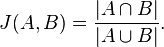


So basically all we've got to do is get a list of all the comic books that two characters, say character A and character B, have appeared in. These lists of comic books form two mathematical sets.

The numerator in that simple formula says to compute the intersection of A and B and then count how many elements are left. More plainly, that's just the number of comic books the two characters have in common.

The denominator tells us to compute the union of A and B and count how many elements are in the resulting set. That's just the number of unique comic books that A and B have ever been in, either at the same time or not.

Pig


Here how we're going to say it using pig:


DEFINE jaccard_similarity `ruby jaccard_similarity.rb --map` SHIP('jaccard_similarity.rb');
edges = LOAD '/data/comics/marvel/labeled_edges.tsv' AS (character:chararray, comic:chararray);
grouped = GROUP edges BY character;
with_sets = FOREACH grouped GENERATE group AS character, FLATTEN(edges.comic) AS comic, edges.comic AS set;
SPLIT with_sets INTO with_sets_dup IF ( 1 > 0 ), not_used if (1 < 0); -- hack hack hack, self join still doesn't work
joined = JOIN with_sets BY comic, with_sets_dup BY comic;
pairs = FOREACH joined GENERATE
with_sets::character AS character_a,
with_sets::set AS character_a_set,
with_sets_dup::character AS character_b,
with_sets_dup::set AS character_b_set
;
similarity = STREAM pairs THROUGH jaccard_similarity AS (character_a:chararray, character_b:chararray, similarity:float);
STORE similarity INTO '/data/comics/marvel/character_similarity.tsv';


Notice we're doing a bit of funny business here. Writing the actual algorithm for the jaccard similarity between two small sets doesn't make much sense in Pig. Instead we've written a wukong script to do it for us (you could also write a Pig udf if you're a masochist).

The first thing we do here is use the DEFINE operator to tell pig that there's an external command we want to call, the alias for it, how to call it, and to SHIP the script we need to all nodes in the cluster.

Next we use the GROUP operator and then the FOREACH..GENERATE projection operator to get, for every character, a the list of comic books they've appeared in.

We also use the FLATTEN operator during the projection as well. The reason is so that we can use the JOIN operator to pull out (character,character) pairs that have at least one comic book in common. (Don't get scared about the gross looking SPLIT operator in there. Just ignore it. It's a hack to get around the fact that self-joins still don't quite work properly in pig. Pretend we're just joining 'with_sets' with itself.)

The last step is to STREAM our pairs through the simple wukong script. Here's what that looks like:


#!/usr/bin/env ruby

require 'rubygems'
require 'wukong'
require 'wukong/and_pig' # for special conversion methods
require 'set'

#
# Takes two pig bags and computes their jaccard similarity
#
# eg.
#
# input:
#
# (a,{(1),(2),(3)}, b, {(2),(9),(5)})
#
# output:
#
# (a, b, 0.2)
#
class JaccardSim < Wukong::Streamer::RecordStreamer
def process node_a, set_a, node_b, set_b
yield [node_a, node_b, jaccard(set_a, set_b)]
end

def jaccard bag_a, bag_b
common_elements = ((bag_a.from_pig_bag.to_set).intersection(bag_b.from_pig_bag.to_set)).size
total_elements = ((bag_a.from_pig_bag.to_set).union(bag_b.from_pig_bag.to_set)).size
common_elements.to_f / total_elements.to_f
end
end

Wukong::Script.new(JaccardSim, nil).run


Notice the nifty 'from_pig_bag' method that wukong has. All we're doing here is converting the two pig bags into ruby 'set' objects then doing the simple jaccard similarity calculation. (3 lines of code for the calculation itself, still want to do it in java?)

And that's it. Here's what it looks like after running:


"HUMAN TORCH/JOHNNY S" "GALACTUS/GALAN" 0.0514112900
"HUMAN TORCH/JOHNNY S" "ROGUE /" 0.0371308030
"HUMAN TORCH/JOHNNY S" "UATU" 0.0481557360
"LIVING LIGHTNING/MIG" "USAGENT DOPPELGANGER" 0.0322580640
"LIVING LIGHTNING/MIG" "STRONG GUY/GUIDO CAR" 0.1052631600
"LIVING LIGHTNING/MIG" "STORM/ORORO MUNROE S" 0.0209059230
"LIVING LIGHTNING/MIG" "USAGENT/CAPTAIN JOHN" 0.1941747500
"LIVING LIGHTNING/MIG" "WASP/JANET VAN DYNE " 0.0398089180
"LIVING LIGHTNING/MIG" "THING/BENJAMIN J. GR" 0.0125120310
"LIVING LIGHTNING/MIG" "WOLFSBANE/RAHNE SINC" 0.0209059230
"LIVING LIGHTNING/MIG" "THUNDERSTRIKE/ERIC K" 0.1153846160
"LIVING LIGHTNING/MIG" "WILD CHILD/KYLE GIBN" 0.0434782600


Sweet.

Sunday, January 16, 2011

Processing JSON Records With Hadoop and Wukong

For another illustration of how Wukong is making it way simpler to work with data, let's process some real JSON records.

Get Data


Download this awesome UFO data at Infochimps. It's over 60,000 documented ufo sightings with text descriptions. Best of all, it's available in tsv, json, and avro formats. Downloading the bz2 package will get you all three.

Explore Data


Once you've got your data set lets crack open the json version and take a look at it:


# weirdness in infochimps packaging (a zipped bz2?)
$: unzip icsdata-d60000-documented-ufo-sightings-with-text-descriptions-and-metad_20101020143604-bz2.zip
Archive: icsdata-d60000-documented-ufo-sightings-with-text-descriptions-and-metad_20101020143604-bz2.zip
creating: chimps_16154-2010-10-20_14-33-35/
inflating: chimps_16154-2010-10-20_14-33-35/README-infochimps
inflating: chimps_16154-2010-10-20_14-33-35/ufo_awesome.tsv
inflating: chimps_16154-2010-10-20_14-33-35/16154.yaml
inflating: chimps_16154-2010-10-20_14-33-35/ufo_awesome.avro
inflating: chimps_16154-2010-10-20_14-33-35/ufo_awesome.json
$: head chimps_16154-2010-10-20_14-33-35/ufo_awesome.json
{"sighted_at": "19951009", "reported_at": "19951009", "location": " Iowa City, IA", "shape": "", "duration": "", "description": "Man repts. witnessing "flash, followed by a classic UFO, w/ a tailfin at back." Red color on top half of tailfin. Became triangular."}
{"sighted_at": "19951010", "reported_at": "19951011", "location": " Milwaukee, WI", "shape": "", "duration": "2 min.", "description": "Man on Hwy 43 SW of Milwaukee sees large, bright blue light streak by his car, descend, turn, cross road ahead, strobe. Bizarre!"}
{"sighted_at": "19950101", "reported_at": "19950103", "location": " Shelton, WA", "shape": "", "duration": "", "description": "Telephoned Report:CA woman visiting daughter witness discs and triangular ships over Squaxin Island in Puget Sound. Dramatic. Written report, with illustrations, submitted to NUFORC."}
{"sighted_at": "19950510", "reported_at": "19950510", "location": " Columbia, MO", "shape": "", "duration": "2 min.", "description": "Man repts. son's bizarre sighting of small humanoid creature in back yard. Reptd. in Acteon Journal, St. Louis UFO newsletter."}
{"sighted_at": "19950611", "reported_at": "19950614", "location": " Seattle, WA", "shape": "", "duration": "", "description": "Anonymous caller repts. sighting 4 ufo's in NNE sky, 45 deg. above horizon. (No other facts reptd. No return tel. #.)"}
{"sighted_at": "19951025", "reported_at": "19951024", "location": " Brunswick County, ND", "shape": "", "duration": "30 min.", "description": "Sheriff's office calls to rept. that deputy, 20 mi. SSE of Wilmington, is looking at peculiar, bright white, strobing light."}
{"sighted_at": "19950420", "reported_at": "19950419", "location": " Fargo, ND", "shape": "", "duration": "2 min.", "description": "Female student w/ friend witness huge red light in sky. 2 others witness. Obj pulsated, started to flicker. Winked out."}
{"sighted_at": "19950911", "reported_at": "19950911", "location": " Las Vegas, NV", "shape": "", "duration": "", "description": "Man repts. bright, multi-colored obj. in NW night sky. Disappeared while he was in house."}
{"sighted_at": "19950115", "reported_at": "19950214", "location": " Morton, WA", "shape": "", "duration": "", "description": "Woman reports 2 craft fly over house. Strange events taking place in town w/ paramilitary activities."}
{"sighted_at": "19950915", "reported_at": "19950915", "location": " Redmond, WA", "shape": "", "duration": "6 min.", "description": "Young man w/ 2 co-workers witness tiny, distinctly white round disc drifting slowly toward NE. Flew in dir. 90 deg. to winds."}


looks pretty interesting. As one last (obvious to some, sure) simple check lets see how big it is:


$: ls -lh chimps_16154-2010-10-20_14-33-35
total 220M
-rw-r--r-- 1 jacob 3.4K 2010-10-20 09:34 16154.yaml
-rw-r--r-- 1 jacob 908 2010-10-20 09:34 README-infochimps
-rw------- 1 jacob 72M 2010-10-20 09:33 ufo_awesome.avro
-rw------- 1 jacob 77M 2010-10-20 09:33 ufo_awesome.json
-rw------- 1 jacob 72M 2010-10-20 09:33 ufo_awesome.tsv


Load Data


Now, 77M is small enough that you COULD process on a single machine with methods you already know. However, this example is about hadoop so let's go ahead and throw it on the hadoop distributed file system (HDFS) so we can process it in parallel:

hdp-mkdir /data/domestic/ufo
hdp-put chimps_16154-2010-10-20_14-33-35/ufo_awesome.json /data/domestic/ufo/


(I'm going to have to assume you already have a HDFS up an running, see this for a simple how-to.)
If all goes well you should see your file there

hdp-ls /data/domestic/ufo/
Found 1 items
-rw-r--r-- 1 jacob supergroup 80346460 2011-01-16 21:21 /data/domestic/ufo/ufo_awesome.json


Process Data


Let's write a really simple wukong script to find the most popular ufo shapes:


#!/usr/bin/env ruby

require 'rubygems'
require 'wukong'
require 'json'

class JSONMapper < Wukong::Streamer::LineStreamer
def process record
sighting = JSON.parse(record) rescue {}
return unless sighting["shape"]
yield sighting["shape"] unless sighting["shape"].empty?
end
end

class ShapeReducer < Wukong::Streamer::AccumulatingReducer

def start! shape
@count = 0
end

def accumulate shape
@count += 1
end

def finalize
yield [key, @count]
end

end

Wukong::Script.new(JSONMapper, ShapeReducer).run


Mapper


Our mapper class, JSONMapper, is nearly identical to the earlier post. All it does is read in single json records from $stdin, parse out the "shape" field (with some rescues for handling data nastiness), and emit the "shape" field back to $stdout.

Reducer


The reducer, ShapeReducer, is about the simplest reducer in Wukong that still illustrates the major points:

* start! - the first method that is called on a new group of data. A group is, if you remember your map-reduce, all records with the same key. In this case it's all the "shape" fields with the same shape. All this method does is decide how to initialize any internal state a reducer has. In this case we simply initialize a counter to 0.

* accumulate - even simpler. This method operates on each record in the group. In our simple case we just increment the internal counter by 1.

* finalize - the final step in the reduce. We've processed all our records and so we yield the key corresponding to our group (that's just going to be the unique "shape") and the count so far.

And that's it. Let's save it into a file called "process_ufo.rb" and run it locally on 10000 lines:


$: cat chimps_16154-2010-10-20_14-33-35/ufo_awesome.json| head -n10000| ./process_ufo.rb --map | sort | ./process_ufo.rb --reduce | sort -nk2 | wu-lign
changed 1
dome 1
flare 1
hexagon 1
pyramid 1
crescent 2
round 2
delta 8
cross 25
cone 41
teardrop 79
rectangle 112
egg 113
chevron 128
diamond 137
flash 138
cylinder 155
changing 204
cigar 255
formation 290
oval 333
unknown 491
sphere 529
circle 667
other 721
disk 727
fireball 799
triangle 868
light 1760


Notice when we run this locally we have to stick the "sort" program in there. This is to simulate what hadoop gives us for free. It looks like light is going to come out ahead. Let's see what happens when we run it with hadoop:


$: ./process_ufo.rb --run /data/domestic/ufo/ufo_awesome.json /data/domestic/ufo/shape_counts
I, [2011-01-16T21:51:43.431534 #11447] INFO -- : Launching hadoop!
I, [2011-01-16T21:51:43.476626 #11447] INFO -- : Running

/usr/local/share/hadoop/bin/hadoop \
jar /usr/local/share/hadoop/contrib/streaming/hadoop-*streaming*.jar \
-D mapred.job.name='process_ufo.rb---/data/domestic/ufo/ufo_awesome.json---/data/domestic/ufo/shape_counts' \
-mapper '/usr/bin/ruby1.8 process_ufo.rb --map ' \
-reducer '/usr/bin/ruby1.8 /home/jacob/Programming/projects/data_recipes/examples/process_ufo.rb --reduce ' \
-input '/data/domestic/ufo/ufo_awesome.json' \
-output '/data/domestic/ufo/shape_counts' \
-file '/home/jacob/Programming/projects/data_recipes/examples/process_ufo.rb' \
-cmdenv 'RUBYLIB=$HOME/.rubylib'

11/01/16 21:51:45 INFO mapred.FileInputFormat: Total input paths to process : 1
11/01/16 21:51:46 INFO streaming.StreamJob: getLocalDirs(): [/usr/local/hadoop-datastore/hadoop-jacob/mapred/local]
11/01/16 21:51:46 INFO streaming.StreamJob: Running job: job_201012031305_0221
11/01/16 21:51:46 INFO streaming.StreamJob: To kill this job, run:
11/01/16 21:51:46 INFO streaming.StreamJob: /usr/local/share/hadoop/bin/../bin/hadoop job -Dmapred.job.tracker=master:54311 -kill job_201012031305_0221
11/01/16 21:51:46 INFO streaming.StreamJob: Tracking URL: http://master:50030/jobdetails.jsp?jobid=job_201012031305_0221
11/01/16 21:51:47 INFO streaming.StreamJob: map 0% reduce 0%
11/01/16 21:51:59 INFO streaming.StreamJob: map 100% reduce 0%
11/01/16 21:52:12 INFO streaming.StreamJob: map 100% reduce 100%
11/01/16 21:52:15 INFO streaming.StreamJob: Job complete: job_201012031305_0221
11/01/16 21:52:15 INFO streaming.StreamJob: Output: /data/domestic/ufo/shape_counts
packageJobJar: [/home/jacob/Programming/projects/data_recipes/examples/process_ufo.rb, /usr/local/hadoop-datastore/hadoop-jacob/hadoop-unjar3466191386581838257/] [] /tmp/streamjob3112551829711880856.jar tmpDir=null


As one final step let's cat the output data and take a look at it:


hdp-catd /data/domestic/ufo/shape_counts | sort -nk2 | wu-lign
changed 1
dome 1
flare 1
hexagon 1
pyramid 1
crescent 2
round 2
delta 8
cross 177
cone 265
teardrop 592
egg 661
chevron 757
diamond 909
rectangle 957
cylinder 980
flash 988
changing 1532
cigar 1774
formation 1774
oval 2859
fireball 3436
sphere 3613
unknown 4458
other 4570
disk 4794
circle 5249
triangle 6036
light 12138


Pretty simple?

Saturday, January 15, 2011

Wukong, Bringing Ruby to Hadoop

Wukong is hands down the simplest (and probably the most fun) tool to use with hadoop. It especially excels at the following use case:

You've got a huge amount of data (let that be whatever size you think is huge). You want to perform a simple operation on each record. For example, parsing out fields with a regular expression, adding two fields together, stuffing those records into a data store, etc etc. These are called map only jobs. They do NOT require a reduce. Can you imagine writing a java map reduce program to add two fields together? Wukong gives you all the power of ruby backed by all the power (and parallelism) of hadoop streaming. Before we get into examples, and there will be plenty, let's make sure you've got wukong installed and running locally.

Installing Wukong


First and foremost you've got to have ruby installed and running on your machine. Most of the time you already have it. Try checking the version in a terminal:

$: ruby --version
ruby 1.8.7 (2010-01-10 patchlevel 249) [x86_64-linux]


If that fails then I bet google can help you get ruby installed on whatever os you happen to be using.

Next is to make sure you've got rubygems installed

$: gem --version
1.3.7


Once again, google can help you get it installed if you don't have it.

Wukong is a rubygem so we can just install it that way:

sudo gem install wukong
sudo gem install json
sudo gem install configliere


Notice we also installed a couple of other libraries to help us out (the json gem, the configliere gem, and the extlib gem). If at any time you get weird errors (LoadError: no such file to load -- somelibraryname) then you probably just need to gem install somelibraryname.

An example


Moving on. You should be ready to test out running wukong locally now. Here's the most minimal working wukong script I can come up with that illustrates a map only wukong script:


#!/usr/bin/env ruby

require 'rubygems'
require 'wukong'

class LineMapper < Wukong::Streamer::LineStreamer
def process line
yield line
end
end

Wukong::Script.new(LineMapper, nil).run


Save that into a file called wukong_test.rb and run it with the following:
cat wukong_test.rb | ./wukong_test.rb --map


If everything works as expected then you should see exactly the contents of your script dump onto your terminal. Lets examine what's actually going on here.

Boiler plate ruby


First, we're letting the interpreter know we want to use ruby with the first line (somewhat obvious). Next, we're including the libraries we need.

The guts


Then we define a class in ruby for doing our map job called LineMapper. This guy subclasses from the wukong LineStreamer class. All the LineStreamer class does is simply read records from stdin and gives them as arguments to the LineMapper's process method. The process method then does nothing more than yield the line back to the LineStreamer which emits the line back to stdout.

The runner


Finally, we have to let wukong know we intend to run our script. We create a new script object with LineMapper as the mapper class and nil as the reducer class.

More succinctly, we've written our own cat program. When we ran the above command we simply streamed our script, line by line, through the program. Try streaming some real data through the program and adding some more stuff to the process method. Perhaps parsing the line with a regular expression and yielding numbers? Yielding words? Yielding characters? The choice is yours. Have fun with it.

Meatier examples to come.

Real Deal Concrete Hadoop Examples

If you think you have to be a java programmer to use Hadoop then you've been lied to. Hadoop is not hard. What makes learning hadoop (or more correctly, map reduce) tedious is the lack of concrete and useful examples. Word counts are f*ing boring. The next few posts will overview two of the most useful higher level abstractions on top of hadoop (Pig and Wukong) with copious examples.