Here's what that looks like:
$: head labeled_edges.tsv | wu-lign
"FROST, CARMILLA"      "AA2 35"
"KILLRAVEN/JONATHAN R" "AA2 35"
"M'SHULLA"             "AA2 35"
"24-HOUR MAN/EMMANUEL" "AA2 35"
"OLD SKULL"            "AA2 35"
"G'RATH"               "AA2 35"
"3-D MAN/CHARLES CHAN" "M/PRM 35"
"3-D MAN/CHARLES CHAN" "M/PRM 36"
"3-D MAN/CHARLES CHAN" "M/PRM 37"
"HUMAN ROBOT"          "WI? 9"
Simple Question
A natural question to ask of such an awesome graph is for the similarity between two characters based on what comic books they've appeared in together. This is called the structural similarity since we're only using the structure of the graph and no other meta data (weights, etc). Note that this could also be applied the other direction to find the similarity between two comic books based on what characters they share.
Wee bit of math
The structural similarity is nothing more than the jaccard similarity applied to nodes in a network graph. Here's the definition of that from wikipedia:
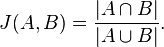
So basically all we've got to do is get a list of all the comic books that two characters, say character A and character B, have appeared in. These lists of comic books form two mathematical sets.
The numerator in that simple formula says to compute the intersection of A and B and then count how many elements are left. More plainly, that's just the number of comic books the two characters have in common.
The denominator tells us to compute the union of A and B and count how many elements are in the resulting set. That's just the number of unique comic books that A and B have ever been in, either at the same time or not.
Pig
Here how we're going to say it using pig:
DEFINE jaccard_similarity `ruby jaccard_similarity.rb --map` SHIP('jaccard_similarity.rb');
edges          = LOAD '/data/comics/marvel/labeled_edges.tsv' AS (character:chararray, comic:chararray);
grouped        = GROUP edges BY character;
with_sets      = FOREACH grouped GENERATE group AS character, FLATTEN(edges.comic) AS comic, edges.comic AS set;
SPLIT with_sets INTO with_sets_dup IF ( 1 > 0 ), not_used if (1 < 0); -- hack hack hack, self join still doesn't work
joined         = JOIN with_sets BY comic, with_sets_dup BY comic;
pairs          = FOREACH joined GENERATE
                   with_sets::character     AS character_a,
                   with_sets::set           AS character_a_set,
                   with_sets_dup::character AS character_b,
                   with_sets_dup::set       AS character_b_set
                 ;
similarity     = STREAM pairs THROUGH jaccard_similarity AS (character_a:chararray, character_b:chararray, similarity:float);
STORE similarity INTO '/data/comics/marvel/character_similarity.tsv';
Notice we're doing a bit of funny business here. Writing the actual algorithm for the jaccard similarity between two small sets doesn't make much sense in Pig. Instead we've written a wukong script to do it for us (you could also write a Pig udf if you're a masochist).
The first thing we do here is use the DEFINE operator to tell pig that there's an external command we want to call, the alias for it, how to call it, and to SHIP the script we need to all nodes in the cluster.
Next we use the GROUP operator and then the FOREACH..GENERATE projection operator to get, for every character, a the list of comic books they've appeared in.
We also use the FLATTEN operator during the projection as well. The reason is so that we can use the JOIN operator to pull out (character,character) pairs that have at least one comic book in common. (Don't get scared about the gross looking SPLIT operator in there. Just ignore it. It's a hack to get around the fact that self-joins still don't quite work properly in pig. Pretend we're just joining 'with_sets' with itself.)
The last step is to STREAM our pairs through the simple wukong script. Here's what that looks like:
#!/usr/bin/env ruby

require 'rubygems'
require 'wukong'
require 'wukong/and_pig' # for special conversion methods
require 'set'

#
# Takes two pig bags and computes their jaccard similarity
#
# eg.
#
# input:
#
# (a,{(1),(2),(3)}, b, {(2),(9),(5)})
#
# output:
#
# (a, b, 0.2)
#
class JaccardSim < Wukong::Streamer::RecordStreamer
  def process node_a, set_a, node_b, set_b
    yield [node_a, node_b, jaccard(set_a, set_b)]
  end

  def jaccard bag_a, bag_b
    common_elements = ((bag_a.from_pig_bag.to_set).intersection(bag_b.from_pig_bag.to_set)).size
    total_elements  = ((bag_a.from_pig_bag.to_set).union(bag_b.from_pig_bag.to_set)).size
    common_elements.to_f / total_elements.to_f
  end
end

Wukong::Script.new(JaccardSim, nil).run
Notice the nifty 'from_pig_bag' method that wukong has. All we're doing here is converting the two pig bags into ruby 'set' objects then doing the simple jaccard similarity calculation. (3 lines of code for the calculation itself, still want to do it in java?)
And that's it. Here's what it looks like after running:
"HUMAN TORCH/JOHNNY S" "GALACTUS/GALAN"        0.0514112900
"HUMAN TORCH/JOHNNY S" "ROGUE /"               0.0371308030
"HUMAN TORCH/JOHNNY S" "UATU"                  0.0481557360
"LIVING LIGHTNING/MIG" "USAGENT DOPPELGANGER"  0.0322580640
"LIVING LIGHTNING/MIG" "STRONG GUY/GUIDO CAR"  0.1052631600
"LIVING LIGHTNING/MIG" "STORM/ORORO MUNROE S"  0.0209059230
"LIVING LIGHTNING/MIG" "USAGENT/CAPTAIN JOHN"  0.1941747500
"LIVING LIGHTNING/MIG" "WASP/JANET VAN DYNE "  0.0398089180
"LIVING LIGHTNING/MIG" "THING/BENJAMIN J. GR"  0.0125120310
"LIVING LIGHTNING/MIG" "WOLFSBANE/RAHNE SINC"  0.0209059230
"LIVING LIGHTNING/MIG" "THUNDERSTRIKE/ERIC K"  0.1153846160
"LIVING LIGHTNING/MIG" "WILD CHILD/KYLE GIBN"  0.0434782600
Sweet.
